You're staring at the Azure portal, and honestly, it’s a mess of branding. You see "AI Services." You see "Azure OpenAI." You see "Cognitive Services." If you’re feeling a little confused about the difference between azure cognitive services and azure openai, you aren’t alone. Most devs and CTOs I talk to are basically trying to figure out if they should buy the specialized Swiss Army knife or the giant, all-knowing power tool that might accidentally cut the table in half.
Here is the thing: they aren’t really "competitors." It’s more about how much of the "thinking" you want the machine to do versus how much "doing" you need it to accomplish.
Microsoft has been shuffling the deck chairs on the branding lately, too. They’ve technically lumped almost everything under the "Azure AI Services" umbrella, but the architectural DNA remains totally different. Cognitive Services are your specialized experts—one does speech, one does vision, one does translation. Azure OpenAI is the big brain, the Large Language Model (LLM) that tries to understand the world through text and patterns.
Why Cognitive Services Are Still the Workhorses
Azure Cognitive Services (now often called Azure AI Services) have been around for years. They are task-specific. If you need to scan a bunch of receipts and pull out the tax amount, you don't necessarily need a multi-billion parameter model like GPT-4o to do that. You just need a high-quality OCR (Optical Character Recognition) engine. That’s what Cognitive Services provides.
These tools are built on "discriminative" AI. Basically, they look at data and categorize it.
Is this a picture of a cat? Yes.
Is this person happy or sad? Sad.
Did the user say "book a flight"? Yes.
One of the coolest things about the difference between azure cognitive services and azure openai is that the older services are often way faster and cheaper for simple tasks. For example, if you use Azure AI Vision to detect a face in a security feed, it’s going to trigger in milliseconds. If you tried to stream that video to GPT-4 to ask "Hey, do you see a human?" you'd be waiting forever for the tokens to process, and your Azure bill would look like a phone number.
Microsoft’s Computer Vision API, Speech-to-Text, and Translator are incredibly mature. They have been trained on specific, massive datasets to do exactly one thing perfectly. They don't hallucinate. A translator might give you a clunky sentence, but it isn't going to suddenly start telling you a story about a dragon because it got bored with your legal document.
The Azure OpenAI "Big Brain" Shift
Then there’s the new kid. Well, not that new anymore, but certainly the loudest.
Azure OpenAI is a partnership. It’s Microsoft providing the enterprise-grade "wrapper" (security, vnets, private links) around OpenAI’s models like GPT-4 and DALL-E. Unlike the specialized tools, this is "generative" AI. It doesn't just categorize; it creates.
When you use Azure OpenAI, you’re accessing a model that has "read" a massive chunk of the internet. It understands nuance. It understands sarcasm. It can write code.
The biggest difference between azure cognitive services and azure openai is the interface: Prompt Engineering. With Cognitive Services, you send an image or text to an API and get a JSON response with a confidence score. With OpenAI, you talk to it. You tell it who it is, what you want, and how it should behave. It’s a completely different way of building software.
I’ve seen teams try to replace their entire sentiment analysis pipeline with OpenAI. Sure, it works. It’s probably even more accurate at catching sarcasm than the old Text Analytics API. But it’s also more expensive. You have to decide if that extra 5% of "vibe" detection is worth the 10x increase in cost per request.
A Real World Scenario: The Customer Support Bot
Think about a standard support bot.
If you use Azure AI Bot Service (part of the Cognitive family), you're likely building a decision tree. User clicks "Refund." Bot looks up policy. Bot asks for Order ID. This is rigid, but it's safe. It’s hard to break.
If you build that same bot with Azure OpenAI, the user can say, "Hey, my dog chewed my shoes and I'm crying, can I get my money back?" The LLM will actually "feel" for the user (or simulate it well), summarize the problem, and maybe even suggest a discount on a chew toy.
The downside? The LLM might accidentally promise the user a free lifetime supply of shoes because it got too helpful. This is why the difference between azure cognitive services and azure openai matters so much for risk management.
Technical Architecture and Data Privacy
One thing people get terrified about—rightfully so—is where their data goes.
With both services, if you are using the Azure enterprise versions, your data is not used to train the global OpenAI models. That’s a huge misconception. Whether you’re using Cognitive Services or Azure OpenAI, your data stays within your Azure tenant.
However, the way you tune them is different.
- Cognitive Services: You often use "Custom Vision" or "Language Studio" to upload your own small datasets to retrain the specific model. You provide 50 pictures of a specific engine part, and now the model knows that part.
- Azure OpenAI: You don't "train" it in the traditional sense most of the time. You use RAG (Retrieval-Augmented Generation). You give the model a search index of your PDFs and say, "Answer questions using only this info."
It’s the difference between teaching a kid to recognize a specific bird and giving a genius an encyclopedia and telling them to look up the bird for you.
Costs, Quotas, and Latency
Let’s talk money. It’s usually the deciding factor anyway.
Azure Cognitive Services generally follows a "pay-per-call" model. It’s predictable. You know exactly what 1,000 transactions of OCR will cost.
Azure OpenAI uses "tokens." This is where things get tricky. A token is roughly 0.75 of a word. You pay for the prompt (what you ask) and the completion (what it answers). If you have a long conversation, that "context window" keeps growing, and every new reply costs more than the last one because you're sending the whole history back to the model.
Latency is also a beast. Cognitive Services are fast. OpenAI is... getting there. GPT-4o is snappy, but it still has "Time to First Token" issues compared to a simple API call that just returns a "Yes/No." If your app needs to respond in under 200ms, you probably shouldn't be using an LLM for the core logic.
Which One Should You Actually Use?
If you are building a tool to translate a website into 40 languages, use Azure AI Translator. Don't overthink it. It’s literally what it’s built for.
If you need to summarize 500 legal contracts and find the "hidden" risks that aren't explicitly mentioned in the text, use Azure OpenAI. You need the reasoning capabilities that a standard keyword-based service just doesn't have.
Most modern "AI" apps are actually using both.
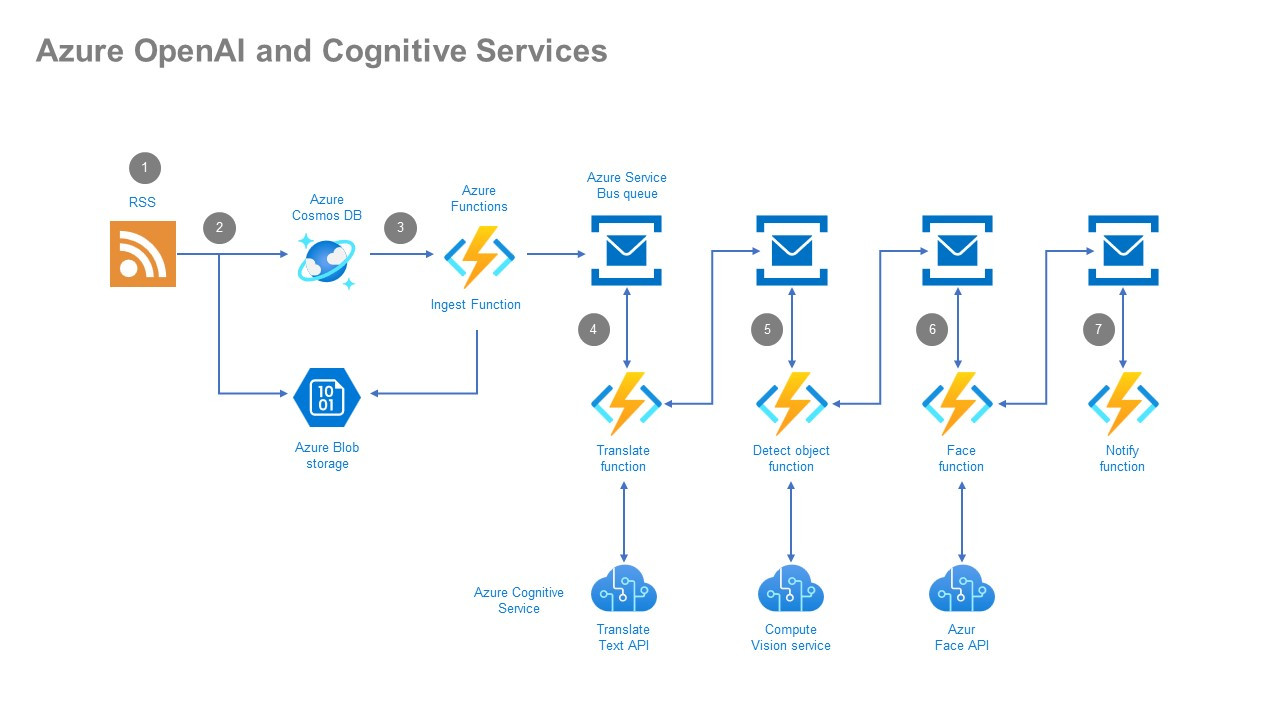
I recently worked on a project where we used Azure AI Speech to turn a phone call into text (transcription). Then, we fed that text into Azure OpenAI to summarize the call and extract action items. Finally, we used Azure AI Content Safety (a cognitive service) to make sure the summary didn't contain any PII (Personally Identifiable Information) before saving it to the database.
That’s the "pro" move. Don't pick a side. Use the specialized models for the grunt work and the LLM for the thinking.
Actionable Insights for Your Next Step
Stop trying to build a "General AI" solution for a specific business problem. It's expensive and hard to maintain. Instead, follow this flow:
- Audit your data format. If you’re dealing purely with structured data or specific media (audio/images for classification), start with Azure AI Services. They are cheaper and more reliable.
- Check for "Reasoning" requirements. Does the task require understanding intent, tone, or complex instructions? If yes, Azure OpenAI is your only real choice.
- Prototype with GPT-4 first. Honestly, it’s easier to build a "lazy" prototype with OpenAI just to see if the idea works. Once you prove the value, look at the logs. See if you can replace parts of that expensive LLM chain with cheaper, faster Cognitive Services.
- Monitor your Token Spend. If you go the OpenAI route, set up cost alerts in the Azure portal on day one. LLM costs can spiral if a loop or a "chatty" user gets out of hand.
- Evaluate Latency. Test your user experience. If the "thinking" spinner is on the screen for more than 3 seconds, your users will hate it. Switch to a smaller model (like GPT-3.5 or GPT-4o-mini) or a dedicated Cognitive Service to speed things up.
The difference between azure cognitive services and azure openai basically boils down to "Task vs. Intellect." Use the right tool for the job, and your Azure bill—and your sanity—will thank you.